
A Stacked Column chart composes of full columns broken into smaller segments. Each column in the chart represents a whole, and segments in the column represent different parts or categories within that whole.
For example, you can use a Stacked Column chart to break down your feedback count and see how much feedback was collected from each flow.
First select Stacked Column Chart from the Chart Selection list:

Start selecting Value:
Measurement: You can select Feedback Count, NPS, CSAT, Sentiment Score, Weighted Score and Chat Score
Compare: You can select the comparement as Unit, User, Flow, Customer, Question, Tag, Time Period, Channel, Content Category and Feedback
Filter: You can add additional filters, such as tags.

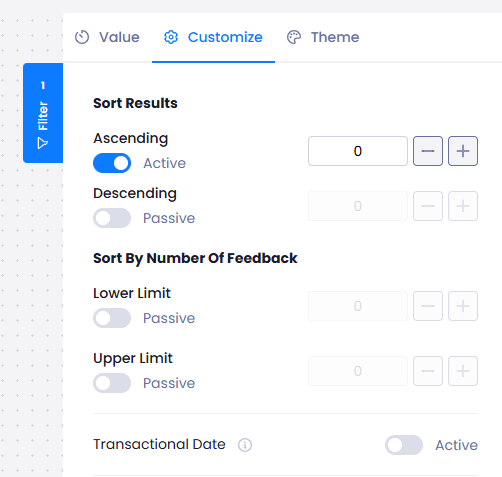
On Customize:
You can show the results in an ascending or descending way, or you can set a lower or upper limit.
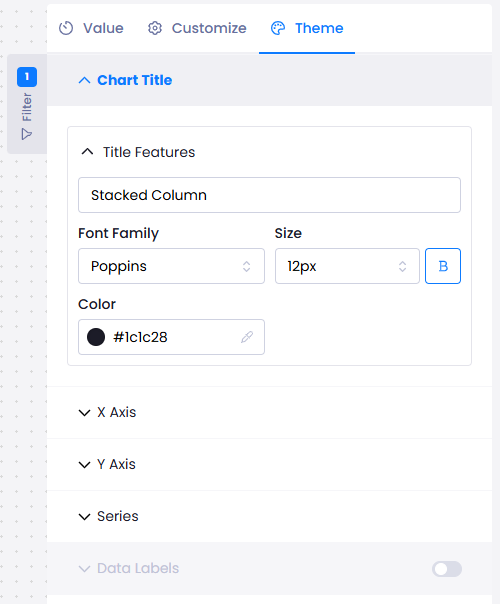
On Theme,
You can customize your analysis by font and colour.
When you are satisfied with the settings you made, click on Publish button on the top right side of the screen to view your analysis on your Reports.