
What You Will Find Here
What You Can Do Here
View Related Tickets
The Related Tickets panel appears in the right sidebar of the feedback screen. It lists linked Ticket Manager tickets with their key, name, and current status.
- Open a feedback in Feedback Inbox.
- Find the Related Tickets panel in the right sidebar.
- Click a ticket key to open its detail page if you have permission to view it.
Tickets you do not have permission to access remain visible with their key and status, but their rows appear greyed out.
Create a Ticket from Feedback
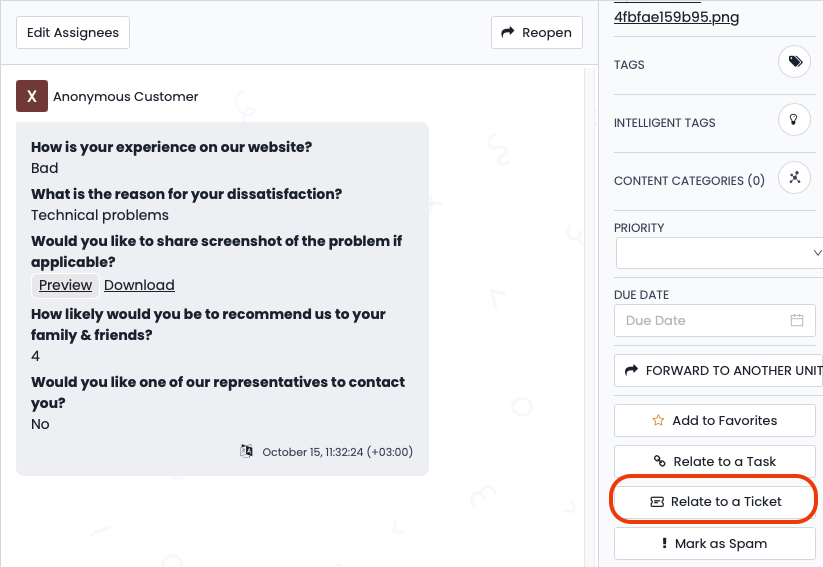
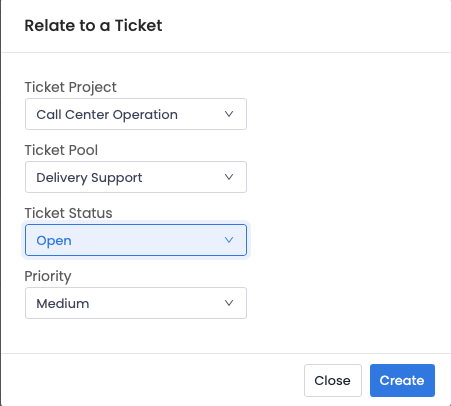
You can create a ticket without leaving the feedback screen.
- Open a feedback in Feedback Inbox.
- In the Related Tickets panel, click Relate to a Ticket.
- In the popup, select the project, pool, ticket status, and priority.
- Click Create.
The new ticket appears immediately in the Related Tickets panel and on the ticket listing page under the selected pool.
FAQs
Can I see tickets I do not have permission to access?
Yes. Their keys and statuses remain visible, but their rows appear greyed out.
Where can I find a ticket created from feedback?
It appears in the Related Tickets panel and in the ticket listing page under the selected pool.