
First of all, the branch is selected from the platform and "Reset" or "Restart" is done for the tablet.
If there is no change, the following operations are performed for the device in order.
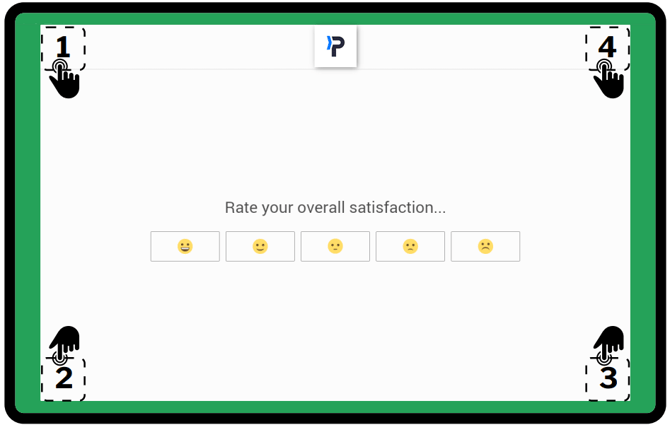
On the screen, respectively;
1 time top left
1 time bottom left
1 time bottom right
by tapping the top right 1 time
On the Activation Code screen that comes up, by touching an empty area without entering a code, the keyboard is closed and the "Restart" option is selected to turn the tablet off and on.
It is necessary to say "Restart" without entering the code. If Restart is not seen, enter the code, press OK, and without pressing Log Out, the Tablet is restarted by pressing and holding the button at the top left.
If there is no change, the following operations are performed for the device in order.
On the screen, respectively;
1 time top left
1 time bottom left
1 time bottom right
by tapping the top right 1 time
On the Activation Code screen that comes up, by touching an empty area without entering a code, the keyboard is closed and the "Restart" option is selected to turn the tablet off and on.
It is necessary to say "Restart" without entering the code. If Restart is not seen, enter the code, press OK, and without pressing Log Out, the Tablet is restarted by pressing and holding the button at the top left.