You can use Pisano to send your surveys as SMS to your customers, or to send text alerts within your organisation via Automated Jobs. Technically, there is no difference, the following applies to both.
- You do not need to be a Pisano user to receive Automated Jobs notifications, only phone number is required.
SMS Service Provider
- To send an SMS, you can use the SMS Service Providers you have previously defined in Pisano or send your SMS campaign to an endpoint you have requested via API.
- Both methods can be used for Cloud or On-premise environments.
- All SMS transactions are sent to the SMS Service Provider one by one during the process.
- Using the SMS Service Provider in Pisano
-
- If the SMS provider API has already been developed, the service provider available in the Admin > Account Settings > SMS Provider menu is selected and the company's configuration is defined (eg. username/password).
- If customer requests another SMS Provider (not included in Pisano), it may need additional planning and development.
2. Sending the SMS campaign to the customer end-point with the API
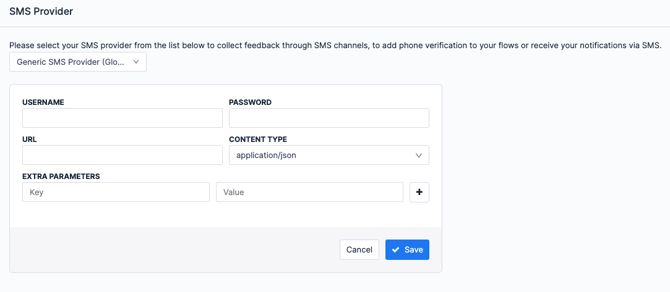
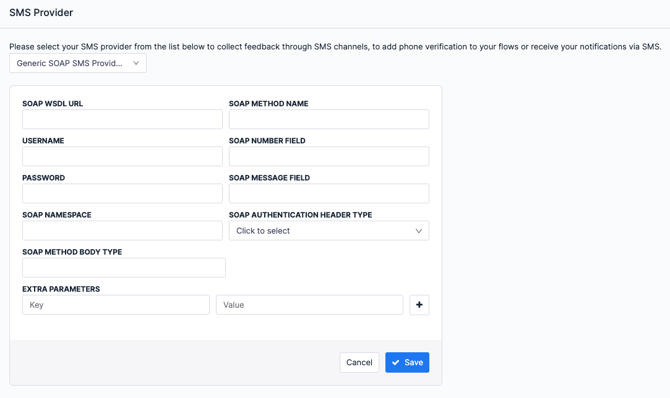
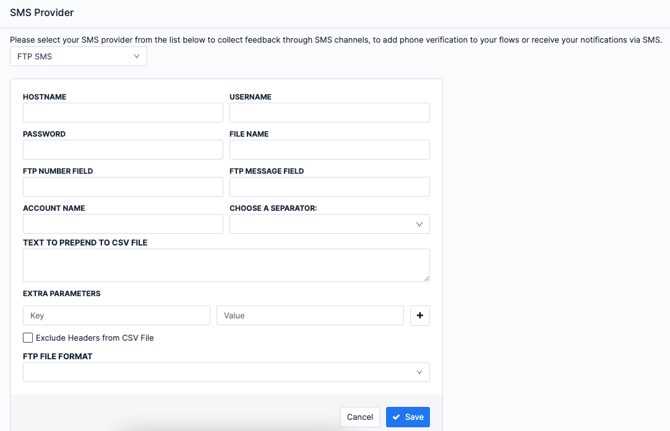
Settings are configured in the Admin > Account Settings > SMS Provider menu. There are several related options in Pisano.-
- Generic SMS Provider (REST service)
-
- Generic with Body Auth (SOAP Service)
-
- FTP SMS
Existing SMS Providers on Pisano
|
MobilDev (Türkiye) |
|
Codec SMS (Türkiye) |
| Twilio (Global) |
| Posta Güvercini (Türkiye) |
| Dataport (Global) |
| Turatel (Türkiye) |
| Jet SMS (Türkiye) |
Collecting Surveys via 2-Way SMS Without Needing a Link
Unlike traditional one-way SMS, 2-Way SMS enables two-way interaction with customers. Survey invitations are sent via SMS, and users can answer the questions step by step directly by replying to the message—without clicking any links or needing an internet connection. This makes the feedback collection process faster, more accessible, and more user-friendly.
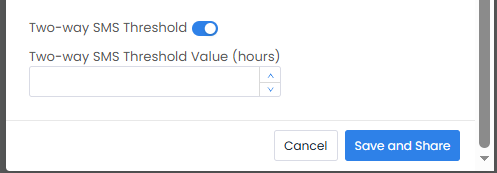
When a campaign is triggered, the system sends the first question to the customer and starts a 24-hour session. As the customer replies, the flow continues step by step. Once the defined time expires, the session is closed, and any responses received afterward may be visible but are not processed by the system. If the customer sends an unexpected response outside the defined options, an automatic fallback message is sent to guide them. All communication is handled via the Jasmin SMS Gateway using the SMPP protocol.
On the technical side, the “Two Way SMS Enabled” flag must be activated in the Message Provider configuration, and the UTF-8 encoder must be enabled for multilingual message support. On the campaign side, the session duration for 2-Way SMS (default: 24 hours) is defined. With this setup, users who complete the survey and those who leave it incomplete can be tracked with different statuses, enabling healthier analysis and reporting of customer feedback.