
NOTE: This is only applicable for files in .csv format.
- Go to Workflows and Create Your Own Workflow > Click "ADD,"

- Select Time-Based".
- Specify the name of the workflow.

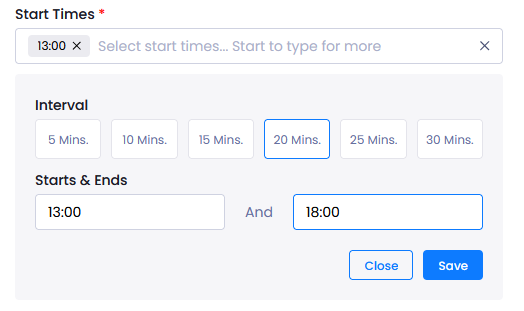
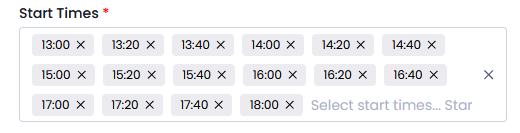
- From Settings determine your Frequency (yearly, daily, monthly, weekly), Start times, Start/End dates and Time Zone.

For start times that occur at intervals, you cna use the "Generate Start Times" button and select your interval. Pisano will create the times for threshold you have selected.
- Then click Add Task and select Download option.
- Enter the Source File Template and FTP server, FTP Username and password, and save.
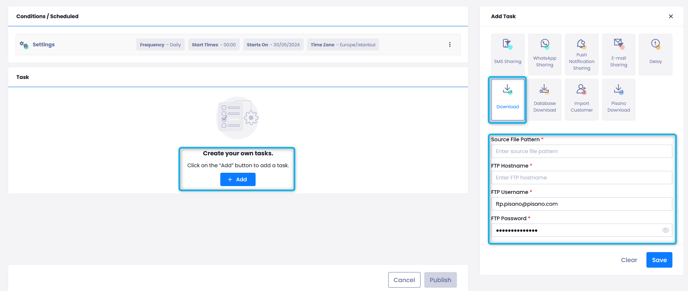
- You can save and activate your workflow with the Publish button.
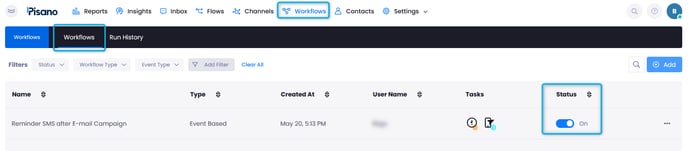
After creating your Workflow, make sure its Status is active on the Workflows page.
FTP Integration supports the SFTP structure.
Port and directory information can be entered into the FTP Server address bar.
For example: ftps://ftps.pisano.com:990/Survey_Directory
For a detailed demonstration, you can watch our interactive video below.