
What You Will Find Here
Who Can Access?
This feature is available by default. Any user with permission to edit Flows can access these settings.
How to Access
-
Open your main dashboard.
-
Click on Flows.
-
Add a new flow or open an existing one.
-
Navigate between the flow pages to locate your questions.
What You Can Do Here
Drag and Drop (Same Page)
Use this method to reorder questions quickly on the page you are currently viewing. It offers a simple way to adjust the sequence of your survey items.
Click and hold the question block.
Drag the block to the desired sequence on the current page.
Release the click to drop the question into place.
The system updates the order of the questions on that specific page immediately.
The Move Button (Across Pages)
To move a question to an entirely different page or to specify an exact numerical position, use the Move button located on the question block.
How to use the Move feature:
- Locate the question you wish to relocate.
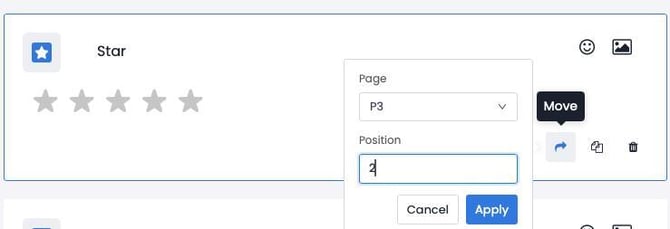
- Click the Move button (represented by an arrow icon) located in the question's action menu.
- A configuration menu will appear with two distinct fields:
- Page: Select the target page from the dropdown menu where the question will be moved (e.g., "P3").
- Position: Input the exact numerical sequence/position the question should take on the target page (e.g., "2").
- Click Apply to execute the move, or Cancel to abort.
Notes:
You can click Cancel in the configuration menu to stop the move before it completes.
Limits and General Notes
The system checks for existing rules or conditional triggers when you move a question. If the system detects a trigger, a warning dialog appears. The dialog states that rules dependent on the element are about to be deleted.
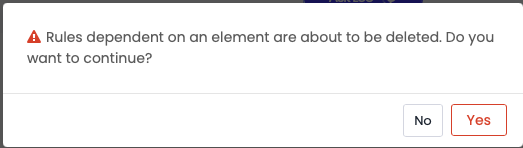
You must click Yes to approve the removal of the existing logic and complete the move. If you click No, the system cancels the action.
Moving a question does not create new triggers in the target location automatically. You must reconfigure any necessary logic manually after the question reaches its new position.
FAQs
Will my question logic stay intact if I move a question to a new page? No. The system deletes existing rules tied to the question during the move. You must set up new rules manually after the move is complete.
Can I cancel a move across pages? Yes. You can click Cancel in the configuration menu. You can also click No on the warning prompt if the question has attached logic.