
What You Will Find Here
Who Can Access?
This feature is available to users who have permission to access Channel Settings.
How to Access
- Select a Channel from your dashboard.
- Click Settings in the navigation menu.
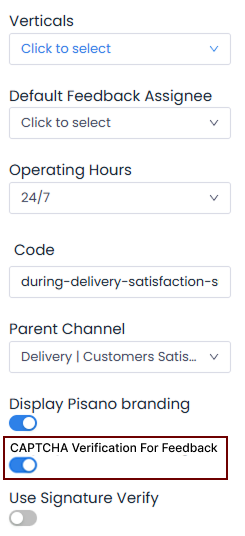
- Locate the CAPTCHA Verification on Feedback section.
You are now in the Channel Settings area where you can manage security preferences.
What You Can Do Here
Enable Captcha Protection and Automatic Provider Fallback
The system uses a primary and secondary provider to maintain security. It attempts to load reCAPTCHA by default. If a user has network restrictions or script errors that prevent reCAPTCHA from loading, the system switches to ALTCHA. This keeps the survey accessible in environments where Google domains are restricted.
- Go to the Channel Settings page.
- Toggle the switch for CAPTCHA Verification on Feedback to the "on" position.
- Save your changes.
Result
The system protects the survey. It automatically attempts to load reCAPTCHA when a user opens the survey. If the connection fails, it switches to ALTCHA.
Notes / Tips / Warnings
- If a session switches to ALTCHA, it remains active for the duration of that session.
- If the user refreshes the page, the system restarts the process and tries reCAPTCHA first.
- The environment must have the global setting enabled for this feature to work.
Apply Full-Flow Security Coverage
Security protection applies to all data entry points in a survey. This coverage is automatic once you enable the feature. It does not require separate configuration for background tasks.
- Enable the captcha setting in your channel.
- Let users interact with the survey by answering questions or submitting forms.
- The system validates the captcha for every request type.
Result
The system applies protection consistently. This includes final submissions and auto-save requests for incomplete surveys. It also covers queued retry requests.
Notes / Tips / Warnings
- The system uses the same security logic across all request types.
- Background saves remain secure without additional steps.
Limits and Notes
Interface Design
The standard Google reCAPTCHA badge is hidden to keep the user interface clean. A "Protected by reCAPTCHA" message appears in the footer instead.
Footer Placement
The placement of the protection text depends on the channel type.
- In link-style channels, the text appears on the left side of the footer.
- In widget channels, the text is integrated into the widget footer layout next to other selectors.
Dynamic Visibility
The "Protected by reCAPTCHA" text is only visible when reCAPTCHA is the active provider. If the system switches to ALTCHA, the text changes accordingly.
FAQs
Why do different users see different captcha providers on the same survey?
This is normal. The system evaluates connection conditions in real time. If a user's network blocks reCAPTCHA, the system provides ALTCHA. This ensures the user can still complete the survey.
Does the captcha protection work if a user is offline?
Yes. If a user answers while offline, the system queues the feedback. The system applies the captcha verification logic when the connection returns and the system sends the response.