
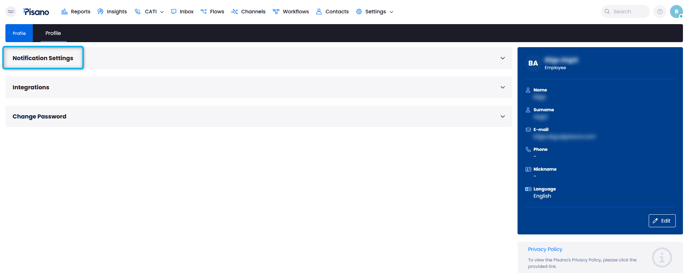
Notification Settings can be accessed by clinking on your profile picture on the bottom left corner of the Pisano page. Afterward, you can simply click the "Notification Settings" tab to view your options.
- Digest Preferences
This menu allows you to set up automatic emails for your reports. The reports you have selected, either standart digest or a custom report, will be sent to your email within the time periods you have selected.
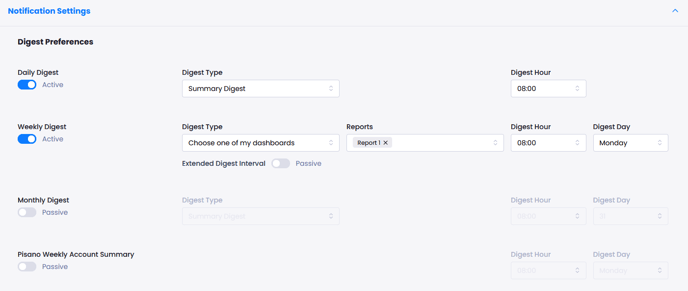
For example, if you want your report to be sent to your email address daily; you should activate the ''Daily Digest'' button, choose the report you want and the delivery time. Ina similar fashion, you can select weekly or monthly notificaitons.
You can select multiple reports, and multiple time frames. Same report can be sent both daily and weekly or in any combination you choose.
- Email Notification Preferences
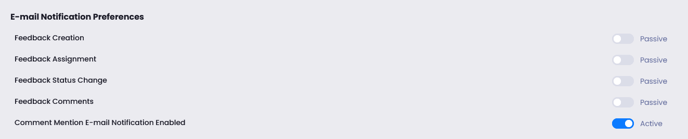
Pisano can alert you regarding the activities on your Pisano account via e-mail. By activating any of the below toggles, you will receive a notificaiton e-mail with the relavent information.
- Score Alerts
Score alerts allows you to be notified regarding the rise or fall of your NPS and CSAT metric.

- Desktop Notification Settings
This option is often used by users of Pisano's chat function. With this setting, you will be notified on your desktop whenever a feedback gets assigned to you.
To make sure this functions correctly, you must allow desktop notifications on your browser settings.
