
What You Will Find Here
Exporting and Setting up the Task
Who Can Access?
This feature is available to all users who have access to the Inbox module.
How to Access
To reach the export settings, follow these steps:
-
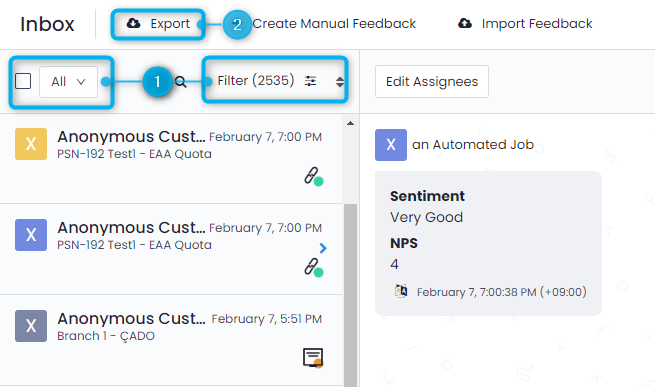
Click Inbox in the main menu.
-
Select the Export button located at the top of the page.
-
The Export Modal will appear on your screen.
What You Can Do Here
Exporting and Setting up the Task
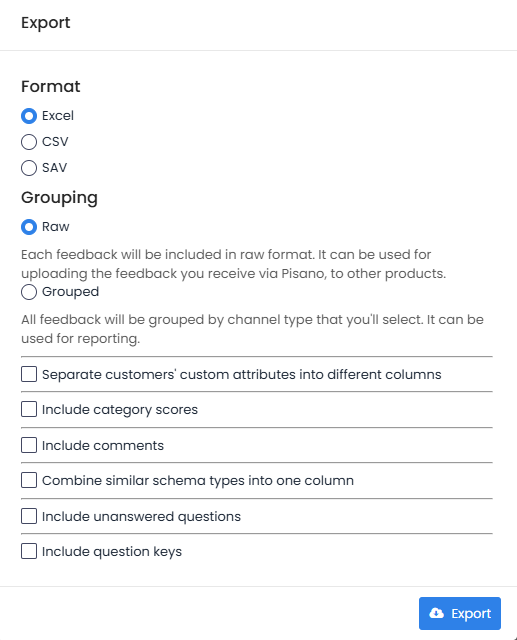
This action allows you to configure the specific format, grouping, and detailed data preferences for your file before the system generates the download.
Step-by-Step Configuration
-
Select your preferred file format: You can choose Excel, CSV, or SAV.
-
Choose a grouping method: Select Raw for data transfers or Grouped for reporting purposes.
-
Select additional data options: Toggle the following settings as needed:
-
Separate customers' custom attributes into different columns: Places each attribute in its own column rather than grouping them together.
-
Include category scores: Adds the calculated scores for your feedback categories to the export.
-
Include comments: Includes all written text responses provided by customers.
-
Combine similar schema types into one column: Merges data from identical question types into a single column for easier comparison.
-
Include unanswered questions: Adds columns for questions that did not receive a response.
-
Include question keys: Includes the technical ID or "key" for each question in the dataset.
-
Final Step: Click the blue Export button. The system processes your request and sends the completed file to your registered email address.
Notes / Tips / Warnings
-
Grouping Differences: Use Raw for technical data migrations and Grouped for high-level reporting by channel.
-
Filters: The export respects your active Inbox view. Apply your desired Status and Filters before clicking the Export button.
-
File Preparation: If you select many additional columns, the file size will increase.
Limits / Notes
-
Delivery Speed: The time it takes to receive your file depends on the volume of data. Larger datasets may take several minutes to arrive in your email inbox.
-
Email Destination: The file is sent only to the email address associated with your account.
FAQs
In what formats can I export my feedback?
You can export all feedback in Excel, CSV, or SAV format. The file will include the data based on the filters you set in the Inbox module.
How will I receive the exported file?
The system sends the file to your registered email address. It usually arrives a short time after you click the export button.
On the screen that opens, you can receive your feedback as Excel or CSV, raw or grouped. You can also choose what information you'd like included.
The file you want to export will reach your e-mail address in a short time in the format you want. The delivery time may be delayed by several minutes depending on the size of your data.