
What You Will Find Here
How to Access
To access Authorized App:
- Go to Settings.
- Click Account Settings.
- Select Authorized App.
Only users with the Admin or Uber Admin role can create new Authorized Apps.
What You Can Do Here
Create an Authorized App
Authorized App allows you to register an application that an external system can use to access Pisano APIs. During creation, you assign a service user role and group to define the application's authorization scope.
- Go to Settings.
- Click Account Settings.
- Select Authorized App.
- Enter the App Name.
- Select the Service User Role.
- Select the Service User Group.
- Create the app.
- Copy the generated client_id and client_secret, or download the credentials as a CSV file.
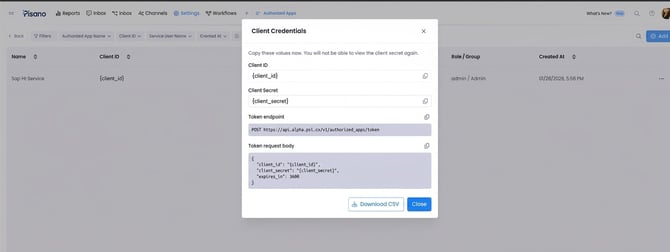
The system generates a unique client_id and client_secret for the application. The credentials are displayed only once and stored in hashed or encrypted form for security reasons.
Notes
- Only Admin and Uber Admin users can create new Authorized Apps, according to the provided feature details.
- The service user role and group define the application's access scope. The token's access is limited by the service user's permissions.
- Copy or download the credentials immediately after creation. The client secret cannot be viewed again after the initial display.
- Authorized App can also serve as a system user when employees leave or are deactivated.
Manage API Access and Tokens
External systems use the credentials generated for an Authorized App to request temporary tokens. These tokens are used to make authorized API calls to Pisano and expire after the configured duration.
- Create an Authorized App and save its client_id and client_secret.
- Send a token request to the Authorized App endpoint using the credentials.
- Optionally specify the token duration in seconds using expires_in.
- Read the token from the response.
- Use the token to make API calls to Pisano.
- Request a new token when the current token expires.
Token Request
Endpoint:
POST {API_URL}/v1/authorized_apps/token Request body:
JSON
{ "client_id": "<client_id>", "client_secret": "<client_secret>", "expires_in": 3600 } The expires_in parameter is optional and specifies the token duration in seconds. In this example, 3600 represents one hour.
Example Response
JSON
{ "token": "…", "expires_at": "2025-01-01T12:34:56Z" } The response includes the token and its expiration time.
Notes
- Access is automatically terminated when the token expires.
- A new token can be obtained when needed.
- The token duration can be specified in seconds in the API request. If expires_in is omitted, the default duration is not specified in the provided information.
- Store the client credentials securely. Do not expose the client secret in client side applications or public locations.
- The endpoint and request examples above are based on the additional technical information provided for this article.
FAQs
Who can create an Authorized App?
Users with the Admin or Uber Admin role can create new Authorized Apps.
Which fields are required when creating an Authorized App?
The application configuration includes App Name, Service User Role, and Service User Group.
How does the service user role affect API access?
The service user role and group determine the application's authorization scope. The token's access is limited by the service user's permissions.
What happens after an Authorized App is created?
The system generates a client_id and client_secret. These credentials are displayed only once. Copy them or download them as a CSV file immediately after creation.
How does an external system obtain a token?
The external system sends a POST request to /v1/authorized_apps/token with the client_id and client_secret. The optional expires_in parameter specifies the token duration in seconds.
What happens when a token expires?
The token becomes invalid and access is automatically terminated. The external system can request a new token when needed.
Can the token duration be configured?
Yes. The optional expires_in parameter specifies the duration in seconds. The default duration when this parameter is omitted is not specified in the available information.
Can Authorized App be used when an employee leaves the organization?
Yes. Authorized App can serve as a system user, including when employees leave or are deactivated.