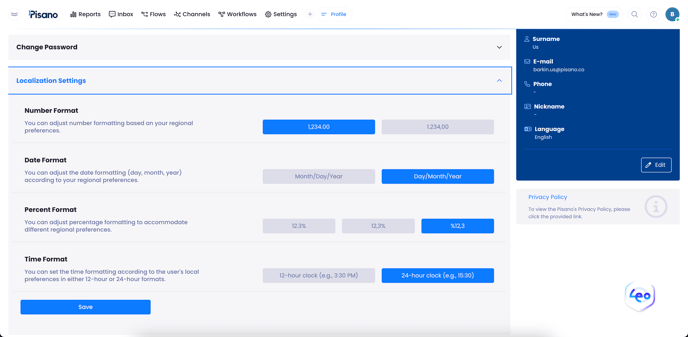
With this feature, you can change the number, date, percentage, and time formats displayed on the platform according to your regional preferences.
🔢 Number Format:
Options such as 1,234.00 or 1.234,00 are available depending on your preference for thousand and decimal separators.
📅 Date Format:
Dates can be displayed as mm/dd/yyyy or dd/mm/yyyy.
📈 Percentage Format:
Different display styles like 12.3%, 12,3%, or %12.3 are supported.
🕐 Time Format:
You can choose between a 12-hour format (3:30 PM) or a 24-hour format (15:30)
🌐 Default Settings Are Based on Region
The system automatically applies default values according to your region:
-
USA: 12-hour, mm/dd/yyyy, 1,234.00, 12.3%
-
Europe / Turkey: 24-hour, dd/mm/yyyy, 1.234,00, %12,3
-
Other regions: European format is applied by default.
Users can customize these settings at any time if they wish.
📍 Where Can I Access It?
Profile > Localization Settings
(step by step: Settings > Profile > Localization Settings)