Importing Feedback
You can import your feedback using the following methods:
- Via Excel (see Importing Feedback from Excel)
- Via API (see How to Transfer Feedback from External Systems to Pisano?)
Each API call generates one feedback. Bulk feedback creation cannot be done with a single call
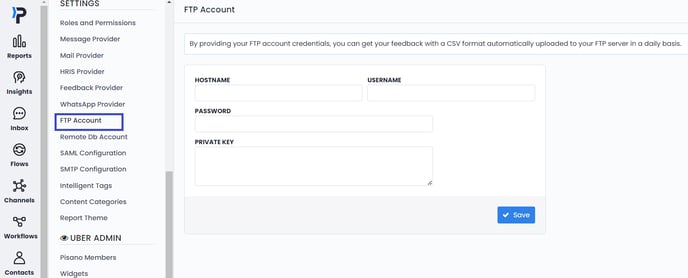
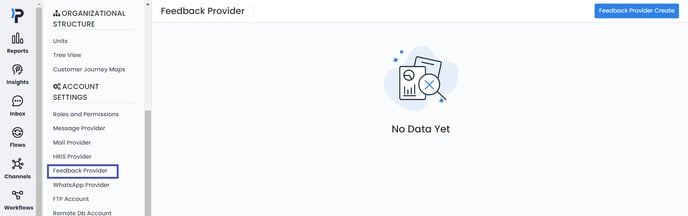
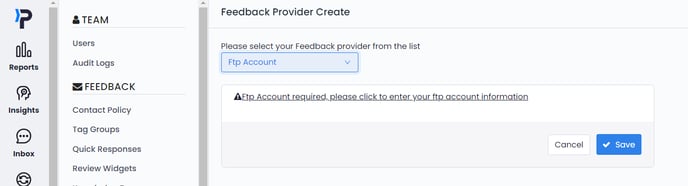
- Via FTP: You can deposit a CSV file prepared according to the transfer template to the FTP address you provide. Pisano reads the files left, overnight once a day and links them to the relevant surveys as feedback. You can establish the FTP connection from the screens below, and file reading will commence automatically overnight.
Exporting Feedback
Below methods can be utilized to export feedback to external systems.
- Exporting via XLSX/CSV (Can I Export My Feedback In An Excel Format?)
- Exporting individual and instantaneous data externally via webhook. (What Is the Webhook Request? How to Set it Up?)
- Exporting via API (see How to retrieve feedbacks from an account via API)
- Exporting via FTP: Pisano leaves the collected feedback in CSV format at the FTP address you provide. Feedback from different surveys is stored in separate CSV files. File transfer occurs once daily, overnight. You can establish the FTP connection from the screen below, and file transfer will begin automatically overnight.