
By using the "Encryption" setting in the flow settings and the "Signature Verification" setting in the channel settings of Pisano, you can make sure that the data comes to the system correctly and without modification.
Encryption
Encryption setting is done on a per-flow basis and must be done separately for each flow. It can only be used in Short Text and Customer Schema question types.
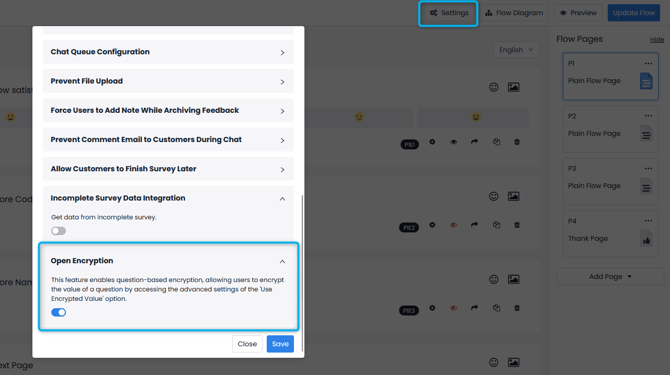
- In order for encryption to be used, the "Open Encryption" setting in the "Flow Settings" menu of the relevant flow must first be activated.
- Then, go to the Settings > Advanced Settings menu of the relevant short text or customer schema question in the flow and activate the "Use Encrypted Value" setting.
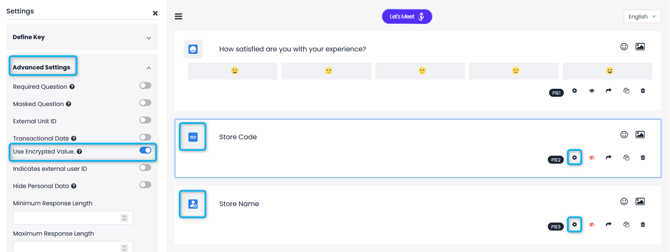
After these settings are made, the selected data will appear encrypted in the flow's links.
Signature Verification
The Signature Verification setting is done on a Channel-by-Channel basis, not on a flow-by-flow basis, and must be set separately for each channel. Signature verification prevents the data you embed in the link from being manipulated by decoding and changing the BASE64 code in the link. For example; If your Store Code is added as 1234 in the link, you will be prevented from leaving a feedback on this link if you change it using Base64.
- To use Signature Verification, you must click on the Edit button of the relevant channel and turn on the "Use Signature Verify" setting in the Advanced Settings tab.
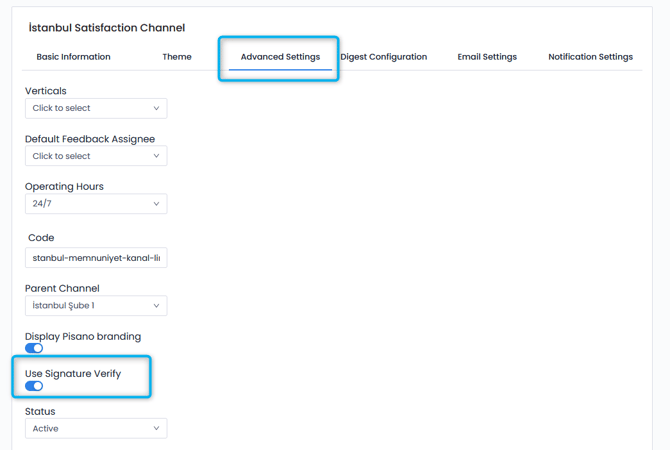
After the setting is activated, the channel signature must be correct in order to leave feedback on the links received from this channel. For example, the link below was taken for a store with the store code 1234.
,https://web.pisano.com.tr/web_feedback?&responses=W3sicXVlc3Rpb24iOiJlbWFpbCIsImFuc3dlciI6bnVsbH0seyJxdWVzdGlvbiI6InBob25lX251bWJlciIsImFuc3dlciI6bnVsbH0seyJxdWVzdGlvbiI6ImV4dGVybmFsX2lkIiwiYW5zd2VyIjpudWxsfSx7InF1ZXN0aW9uIjoic3RvcmVfY29kZSIsImFuc3dlciI6Ijc5ZDk3M2QzLS04Yjc4MzU3NDU2M2YxNThlNGRjMmZkYTMtLWNmNGYwNjA1NjVjZGE4OTIyNjJmNzJhMjI5YmM0MmI5In1d&node_id=e98d599d-f567-4ddb-9079-
cbfadbc55635&ldi=4ac4b0ef-823a-4e9e-adfb-044f11d2d244&lci=8b84af94-1ce0-4b27-ac5b-011c402718fa&creator_id=cd6b9ae9-b066-4372-8ffc-4d01357b209c&signature=08PJe8e%2B1k%2FLZrtlBtxHeLR9pDay6qS2F%2B1H5dWb4GO9dDPLh1RF8OGTYd3G%0AyXHIPLm4RuJr3LJc7%2FOiiH3oym%2BUBpSziImLN2CxhoVrxq7M3PLiTtXrDEWM%0AlOaXpCzmFHj5hBEI02%2FUsa2FK28oO%2Bd%2B0zzx7TOyQRZfqRGWRtXZHhH5aLS9%0AtPnd8aJ3oleit9IR0m2chMeHliqfVphwlx6I4nItaHRN71fn1YnEqGrtPra0%0AcCdlSsjDUINr4ubiEdgeEjVghy17bicTvZwZcljPjTv61VcwRlKFcUUnTLQz%0AsSdcuV4hljS2M1xEVoYYkN6wL1rYXkof%2BzCw9AUmoQ%3D%3D%0A
When the https://web.pisano.com.tr/web_feedback?&responses= field in this link is deleted and the remaining data is deciphered using BASE64, the following result is obtained:
[{"question":"email","answer":null},{"question":"phone_number","answer":null},{"question":"external_id","answer":null},{"question":"store_code","answer":"1234"}]
The area you see as {"question":"magaza_kodu","answer":"1234"} is the 1234 store code embedded in the link. When you encrypt again by entering another data in this field and try to access the link, you will see the following screen: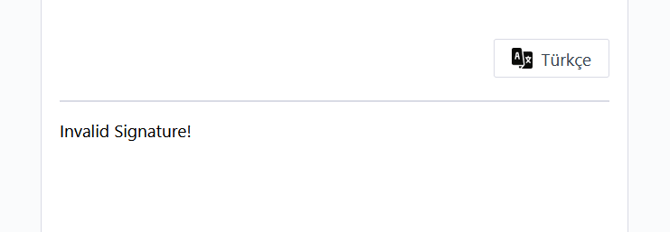
If encryption is enabled in your flow and signature verification is enabled in your channel, changing the link will become even more difficult. The store code will look like this when link with encrypted data is decrypted:
[{"question":"email","answer":null},{"question":"phone_number","answer":null},{"question":"external_id","answer":null},{"question":"store_code","answer":"79d973d3--8b783574563f158e4dc2fda3--cf4f060565cda892262f72a229bc42b9"}]
{"question":"store_code","answer":"79d973d3--8b783574563f158e4dc2fda3--cf4f060565cda892262f72a229bc42b9"} found here is the encrypted version of the 1234 code. In this way, the person trying to change the link cannot write the data he wants instead of the Store Code easily.