
Pisano allows you to interact better with your customers and deal with their problems faster through personalized links. For example; You can see which customers have left negative feedback and you can take action to contact them quickly.
In order to get a Customized Link, you need to have a flow and this flow must have special information areas where you can get customer details.
After these are prepared, you can connect your flow to a channel and take it to the live environment.
With a customized link, you can target a certain customer group (for example, your customers in the Istanbul region) and create personalized links for them.
One thing to consider when creating a customized link is that the "Short Text" question created secretly in the flow is in the Settings section, and the "Question Key" text is exactly the same in the CSV(or .xlsx and .xls) file. Otherwise, your personal links will not work, as the user and link cannot be matched.
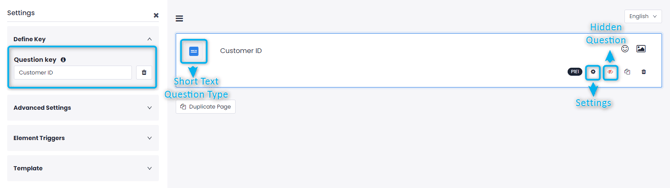
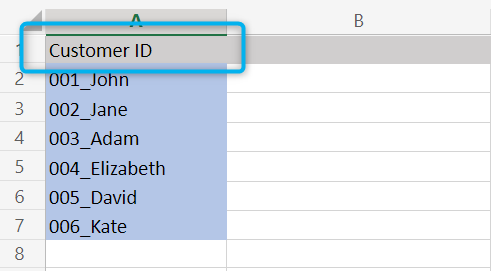
- After you have prepared the Flow and the CSV(or .xlsx and .xls) file that you will create a customized link, go to Channels > Link Channels(Or the channel you choose to use) on Pisano.
- Then open the relevant screen by clicking the "Generate Link" button next to your channel.

- Upload the CSV(or .xlsx and .xls) file you have created.
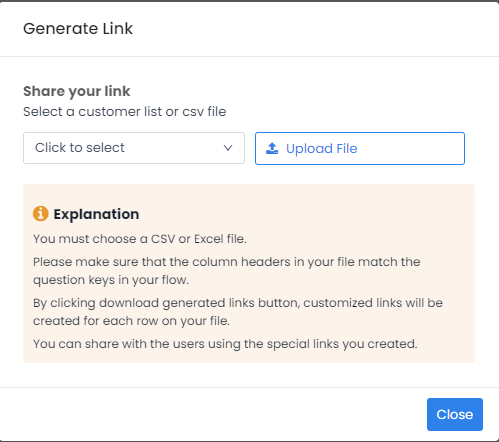
- After uploading your file, you will see a screen like the one below.
- If you want your customers to be registered anonymously, select "Create Link Without Customer Information"
Warning: If the customized links will be used to create QRs to collect anonymous feedback, the "Create Link Without Customer Information" option should be selected. Otherwise, each new feedback will overwrite the previous feedback's owner's contact data.
- If you have specific fields (name, phone, email, etc.), you can select them by "Click to select"
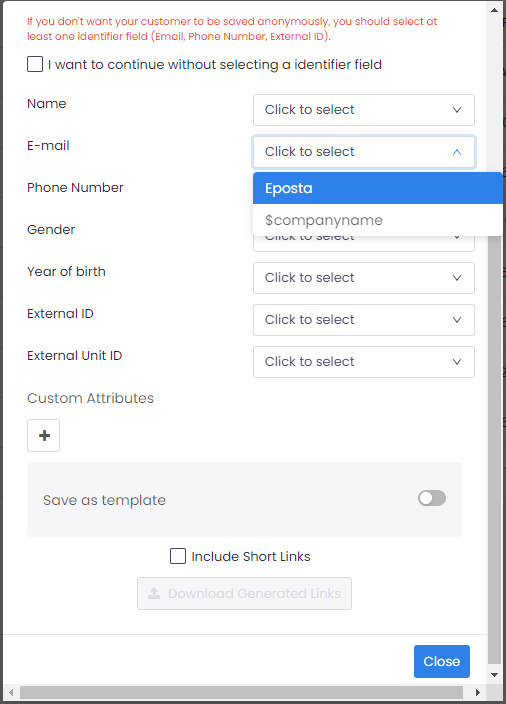
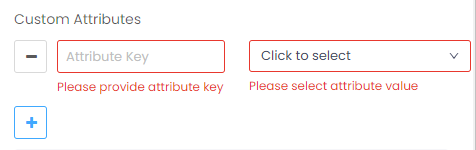
- Or, if you want to feed a certain area in the flow other than these, you can enter the field name by clicking on Custom Attributes + and choose:
If the "Include Short Links" box is checked, one more column will be added to the CSV(or .xlsx and .xls) file that'll be created, and short links will automatically appear alongside long links.
- Afterwards, download your file by clicking the "Download Generated Links" button.
- The downloaded file will look like the example below.
