
What You Will Find Here
Who Can Access?
Only users with the Ticket Admin role can access and manage Custom Ticket Statuses.
How to Access
How to Access
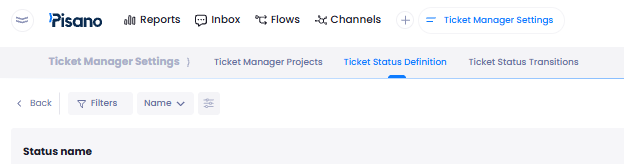
To access the custom ticket status management area:
- Go to Settings.
- Click Automation.
- Click Ticket Manager Settings.
- Click Ticket Status Definition.
You can manage custom ticket statuses from this page.
What You Can Do Here
Create Custom Ticket Statuses
You can create additional ticket statuses for the current project and adapt the ticket lifecycle to your team's operational process.
- Go to Ticket Manager Settings.
- Open Ticket Status Definition.
- Click the create a new custom status icon in the upper-right corner
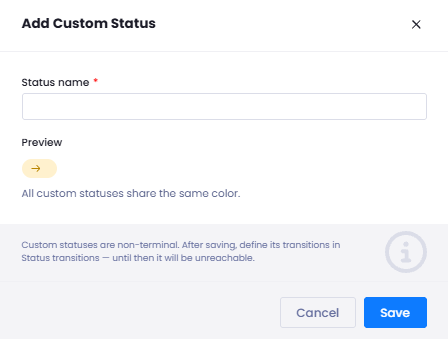
. - Enter the status name.
- Save the custom status.
After you save the status, it becomes available as an additional project level ticket status alongside the existing system statuses.
Notes
- You can create up to 20 custom statuses for each project.
- Custom statuses are always active and non terminal.
- Examples include Pending Customer, Under Review, and Awaiting Approval.
- The existing system statuses Open, In Progress, Waiting, Escalated, Closed, and Reopened remain available.
Edit and Order Custom Ticket Statuses
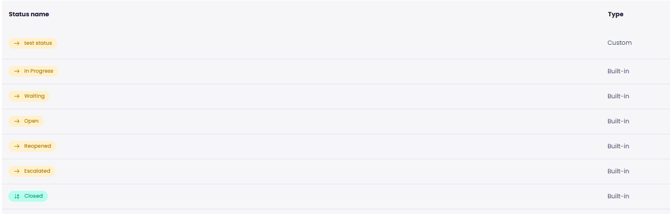
You can update the name of an existing custom status and define its position in the status order. This helps you keep the status sequence aligned with your team's operational process.
- Go to Ticket Status Definition.
- Select an existing custom status.
- Edit the status name if needed.
- Set its position in the status order.
The updated name and position are saved for the custom status.
Notes
- The system statuses Open, In Progress, Waiting, Escalated, Closed, and Reopened continue to remain available.
- Custom statuses are managed at the project level.
Configure Status Transitions
After you create a custom status, you need to define how tickets can move to and from that status.
- Create a custom status in Ticket Status Definition.
- Open Status Transition Settings.

- Define the required From and To rules for the new custom status.
Once the required transition rules are configured, tickets can move between statuses according to the rules defined by the Ticket Admin.
Notes
- Status transitions are not created automatically for new custom statuses.
- If the required From and To rules are not configured, tickets cannot be moved to the new custom status.
- Newly created custom statuses automatically appear in Status Transition Settings so you can configure their transitions.
Limits and Notes
- A project can have up to 20 custom ticket statuses.
- Custom statuses are project level. Each team can create statuses that reflect its own operational process.
- Custom statuses are always active and non terminal.
- Closed remains the only status that ends a ticket.
- Existing closure related behavior continues to work in the same way because custom statuses do not end tickets. This includes the closure form, resolution time, reopen count, and workflow behavior.
- Custom statuses appear with their own status in ticket detail, ticket listing, and reporting screens.
- You can track custom statuses separately in reports.
- A custom status that is currently in use cannot be deleted accidentally. Its usage on the relevant tickets must end before the status can be deleted.
FAQs
How many custom ticket statuses can I create for a project?
You can create up to 20 custom ticket statuses for each project.
Do I need to configure transitions after creating a new custom status?
Yes. Transitions are not created automatically. You must define the required From and To rules in Status Transition Settings before tickets can move to the new custom status.
Can a custom status close a ticket?
No. Custom statuses are always active and non terminal. Closed remains the only status that ends a ticket.