
Different languages can be added onto the same flow for the end user to select from.
After you have prepared your flow in the original language, you can add more languages by using the button on the upper right corner on the flow page.
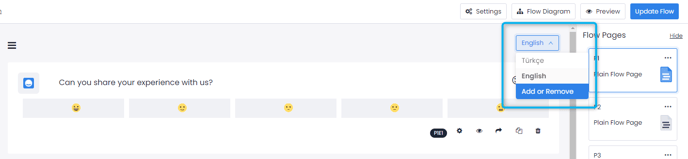
On the pop-up that opens, you can add the new languages and select your default language. 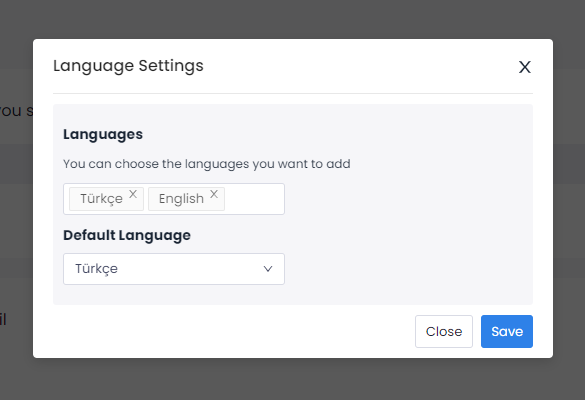
After adding the language, select it again from the language drop down and start adding the translations of the questions and options. Note that you must enter each translation yourself, Pisano does not translate flows.
There is no limit to how many languages you can add in a survey. If you set up your surveys in multiple languages; you can also choose a language as 'default language' while creating the channel to dictate which language will initially appear.
Pisano supports following languages:
Arabic (العربية)
Azerbaijani (Azərbaycan)
Bengali (বাংলা)
Bulgarian (Български)
Chinese (Simplified) (中文(简体))
Croatian (Hrvatski)
Czech (Čeština)
Danish (Dansk)
Dutch (Nederlands)
English
Estonian (Eesti)
Finnish (Suomalainen)
French (Français)
German (Deutsch)
Greek (Ελληνικά)
Hebrew (עִברִית)
Hindi (हिंदी)
Hungarian (Magyar)
Icelandic (Íslenska)
Irish (Gaeilge)
Italian (Italiano)
Japanese (日本語)
Kazakh (Қазақша)
Korean (한국어)
Latvian (Latvijas)
Lithuanian (Lietuvos)
Maltese (Malti)
Persian (فارسی)
Polish (Polskie)
Portuguese (Português)
Romanian (Română)
Russian (русский)
Serbian (Српски)
Slovak (Slovenčina)
Slovenian (Slovenščina)
Spanish (Español)
Swedish (Svenska)
Turkish (Türkçe)