

Overview
- Learn what ticket management is, how customer tickets evolved over time, and why they remain the foundation of effective issue resolution.
- Explore how XM platforms use automated triggers, intelligent routing, and centralized ticket workspaces to turn customer feedback into coordinated action across teams.
- Understand how ticket management powers the CX Inner Loop by helping organizations resolve individual customer issues while generating insights that support long term improvements through the Outer Loop.
Think about the sheer relief of having the right tool for a difficult job. We discussed the core theory of the inner loop in our previous guide. You know exactly why you need to intercept an angry account before frustration turns into churn. Now comes the hard part: actually executing that plan across an entire organization.
Doing this manually is like trying to coordinate airport traffic with sticky notes. At first, it feels manageable. Then suddenly three customers need urgent attention, five teams are involved, and nobody remembers who promised what. This is where modern XM platforms step in. They turn good intentions into a repeatable process.
What Is Ticket Management and Its Role in the Inner Loop?

What is ticket management exactly?
At its simplest, ticket management is the process of turning a customer issue into a trackable record. Someone owns it. Someone works on it. Someone confirms it is resolved.
The inner loop is your immediate response to customer dissatisfaction. A customer gives a low survey score, leaves an unhappy comment, or signals that something went wrong. You reach out, understand the issue, and work to resolve it.
Ticket management is the operational backbone that makes this possible.
Without a ticketing system, follow ups depend on memory. Emails disappear into crowded inboxes. Chat messages get buried beneath discussions about lunch plans and sprint deadlines. Ownership becomes vague. Accountability fades.
A ticketing system brings structure to what is often an emotional and time sensitive situation. Every complaint has a place. Every action has a record. Every customer gets a better chance of being heard.
A Brief History of the Customer Ticket
Let us step back for a moment.
What is a ticket, conceptually?
A ticket is much more than a task in a software system. It is a formal record that says, "This issue exists, someone owns it, and it must be resolved."
Every ticket contains three essential elements:
- A problem that needs attention
- A person or team responsible for solving it
- A record of what happened along the way
That basic structure has remained surprisingly consistent throughout history. The technology has changed dramatically, but the purpose has stayed the same. A ticket creates accountability. It prevents problems from being forgotten. It gives customers confidence that their concerns are being taken seriously.
In many ways, a ticket is simply proof that someone owes you a solution.
The First Ticket in History
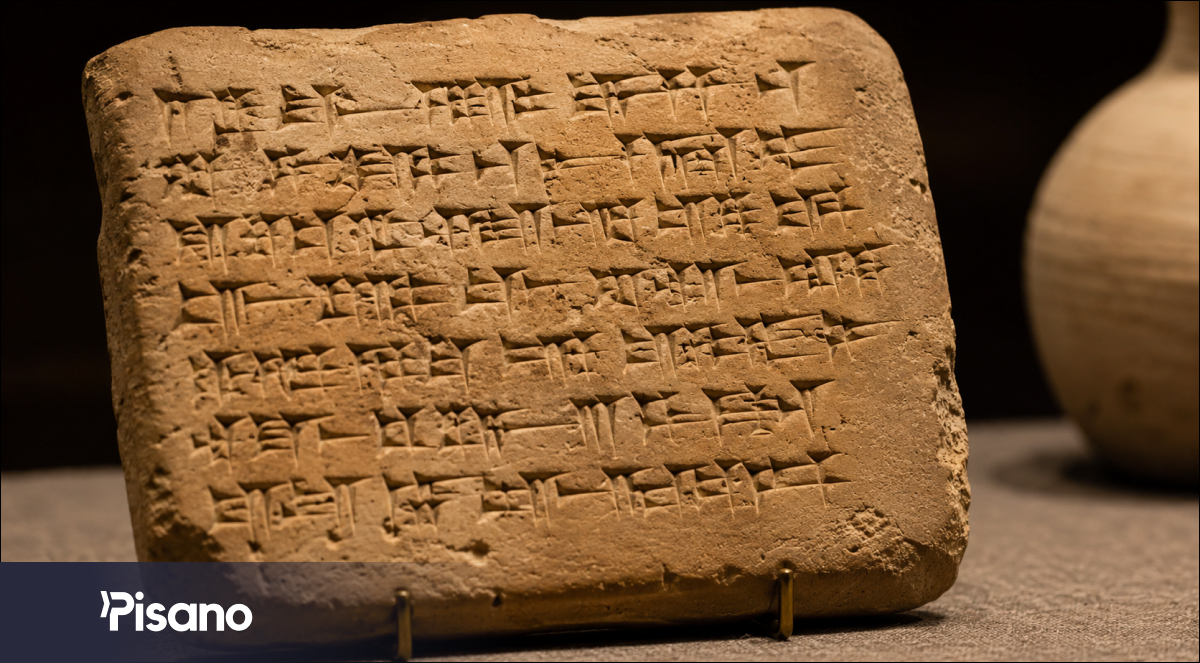
If we search for one of the earliest customer complaints ever recorded, we find ourselves in ancient Mesopotamia around 1750 BCE.
A merchant named Ea nasir sold copper to a customer named Nanni. The copper was poor quality. Nanni was not pleased.
Instead of posting an angry review online, he did the Bronze Age equivalent. He wrote a remarkably detailed complaint onto a clay tablet and sent it to the merchant. The message survives today, making it one of history's oldest known customer service escalations.
In modern terms, Nanni opened a support ticket.
The response time remains unknown.
From Paper Slips to Digital Queues
For thousands of years, the idea remained surprisingly similar.
Restaurants relied on handwritten slips to communicate problems between dining rooms and kitchens. Hotels maintained logbooks for guest complaints. Airlines tracked service issues on paper forms. Call centers eventually filled entire rooms with filing cabinets packed with customer records.
Then came digital systems.
IT departments were among the first to formalize ticket management. A broken application generated a ticket. An engineer investigated the issue. The problem was fixed. The ticket was closed.
Efficient? Absolutely.
Human? Not always.
Many of these systems tracked technical resolutions perfectly while paying very little attention to the customer experience surrounding them. A server might be repaired in two hours, while the customer spent those same two hours wondering if anyone was working on the issue at all.
How XM Platforms Change the Rules
Experience Management introduces a different perspective.
Traditional ticketing asks, "Was the problem fixed?"
XM asks, "How did the customer feel throughout the process?"
That distinction changes everything.
Customers rarely remember every technical detail of a resolution. They remember whether someone listened. They remember whether updates were communicated. They remember whether they felt ignored.
Modern XM platforms connect operational fixes directly to customer outcomes. Resolving an issue is only part of the journey. Communicating the resolution and rebuilding trust are equally important.
That is the difference between a system that closes tickets and a system that improves experiences.
Core Elements of a Ticket Management Module of an XM Platform
Let us look at the components that make all of this work.
Automated Listening Triggers
Reading thousands of survey responses manually is neither realistic nor particularly enjoyable.
The trigger module acts as a 24 hour monitoring system.
You define rules inside the platform. A customer gives a satisfaction score below a certain threshold. A survey contains specific keywords. A sentiment analysis model detects frustration.
The moment those conditions are met, the platform creates a ticket automatically.
No waiting. No manual review. No chance of a critical issue sitting unnoticed over the weekend.
Intelligent Ticket Routing
Customers do not care about your organizational chart.
They simply want their problem solved.
Intelligent routing analyzes the context of incoming feedback and sends it directly to the right team. Billing concerns go to finance. Product defects reach engineering. Service complaints land with the responsible manager.
Think of it as an air traffic controller for customer feedback.
Instead of circling endlessly, tickets land exactly where they need to.
The Central Ticket Workspace
As tickets move across departments, organizations need a single place where everyone can see the full story.
This central workspace acts as the operational heart of the ticket management process. Team members can view assigned tickets, track progress, add notes, collaborate with colleagues, and maintain a complete record of customer interactions.
An account manager can bring an engineer into a discussion. A support specialist can add customer context. A manager can monitor open issues and resolution times without chasing updates across emails, spreadsheets, and chat threads.
This shared environment ensures that information stays connected to the ticket itself rather than becoming scattered across different tools. Everyone involved works from the same source of truth.
Many modern XM platforms include dedicated ticket management modules to support this workflow. For example, Pisano's Ticket Manager provides a centralized environment where teams can collaborate on customer issues and close the loop efficiently.
Most importantly, the complete history captured in this workspace becomes valuable input for outer loop analysis, helping organizations identify recurring issues and long term improvement opportunities.
Outer Loop Analytics
Resolving one complaint is helpful.
Eliminating the cause of a thousand complaints is transformative.
Outer loop analytics aggregate ticket data across the entire organization. The platform identifies recurring themes, emerging trends, and systemic weaknesses.
Maybe dozens of tickets point to a confusing onboarding process. Maybe a particular product feature consistently generates frustration. Maybe a policy creates unnecessary friction for customers.
Patterns that are invisible in individual cases become obvious when viewed at scale.
Instead of treating symptoms repeatedly, teams can address root causes and improve experiences for everyone.
Conclusion: Building a Reliable Engine
The inner loop is not powered by good intentions alone.
It requires structure, accountability, visibility, and speed.
XM platforms provide the framework that turns customer feedback into meaningful action. They help teams identify issues quickly, route them intelligently, collaborate effectively, and learn from every interaction.
The result is simple: fewer unresolved problems, stronger customer relationships, and a feedback process that actually drives improvement.
Because in customer experience, the fastest way to lose trust is ignoring a problem.
The fastest way to build trust is proving that someone is listening.