
You can provide survey sending to your customers via Push Notification using one of the following methods
- In Pisano, sending Push Notifications with Push Notification channel and Message Provider infrastructures:
- As the Message Provider, the endpoint details of your Push Notification Service capable of receiving weblinks must be entered.
- When sending surveys through Pisano (manually or via API), customer information, Push Notification message, and a personalized short survey link will be sent to the relevant service.
- The survey link sent to the service will be a weblink. To manage this for in-app opening, you need to make the necessary adjustments with your mobile teams.
- For sending Push Notifications, the link shortening service must be active. The Pisano service is active in the cloud. For on-premises usage, it is expected that the customer's link shortening service is configured or the Pisano service is used.
- In Pisano, sending Push Notifications via the Link channel infrastructure:
- In Pisano, the anonymized link obtained from a link channel can be personalized if desired and used to communicate with the customer.
- In this method, the creation of the link and the delivery of the push notification to the customer are done externally to Pisano. You can contact your relevant technical team for this task.
- The received link will be a weblink, and you need to make the necessary adjustments with your mobile teams for it to open in-app.
Sending Surveys via Push Notifications Channel
The following steps should be followed for sending surveys via Push notifications:
- Configuring Message Provider: You can make the configuration using interactive video.
- Defining the Push Notifications channel, connecting it to the relevant flow, and selecting the message provider to be used.
- In order to send Push Notifications, the link shortening service must be active. The Pisano service is active in the cloud. For on-premises usage, it is expected that the customer's link shortening service is configured or the Pisano service is used
- Triggering the flow/survey
- Manual triggering by uploading a CSV file: This method is preferred for bulk survey sending. It is used when survey sending is not frequent on a daily basis. Since surveys will be triggered manually, preparation by the business unit is required.
- Triggering surveys via Workflow: This method is preferred if bulk survey sending is desired to be done automatically at scheduled times.
- Triggering the survey using an API (Push Notification Sharing) (on this page): This method is preferred for automatically triggering transaction-based surveys. Surveys can be sent immediately after the customer completes a transaction. The system sending the request decides when the API will be triggered. Once the API is triggered, Push notifications sending is facilitated.
Triggering the Survey via API (Push Notifications Sharing)
Endpoint Details
POST https://<pisanoURL>/v1/push_notification_campaigns/:campaign_id/push_notification_sharings/
*** pisanoURL information will be shared with you by Pisano.
*** For on-premises customers, the PisanoURL information should be replaced by the system administrator, in the API configmap (ENV) within the api_host variable
Parameters
Parameter
Value
campaign_id
Campaign ID to be sent via Push notifications (explained below)
phone_numbers
Array of phone numbers
custom_attributes
Customer-specific information fields and values. JSON Object
built_in_responses
Feedback-based information to be embedded in the link. JSON Object
Headers (HTTP Header)
Header
Value
Content-Type
application/json
Authorization
Token token= <API TOKEN>
Sample cURL Request
curl --location --request POST 'https://<pisanoEnvironment>/v1/push_notification_campaigns/<campaignID>/push_notification_sharings' \
--header 'Authorization: <token>' \
--header 'Content-Type: application/json' \
--data-raw '{
    "phone_numbers": [
        "<phone>"
    ],
    "custom_attributes": {
        "<phone>": {
            "name": "<name>",
            "external_id": "<external_id>",
            "email": "<email>"
        }
    },
    "built_in_responses": {
        "<phone>": {
            "customerDetailedInformation1": "<customerDetailedInformation1>",
            "customerDetailedInformation2": "<customerDetailedInformation2>",
            "customerDetailedInformation3": "<customerDetailedInformation3>"
        }
    }
}'
# 20 requests in 5 seconds
# 40 requests in 25 seconds
# 80 requests in 125 seconds (~2 min)
# 160 requests in 625 seconds (~10 min)
It is recommended as a best practice to trigger up to a maximum of 5000 customers in a single request.
In on-premise installations, Email & SMS & Push notifications & Link throttle limits can be increased or completely removed. Throttle rules can be configured based on IP in on-premise installations.
Obtaining API ID (campaign_id)
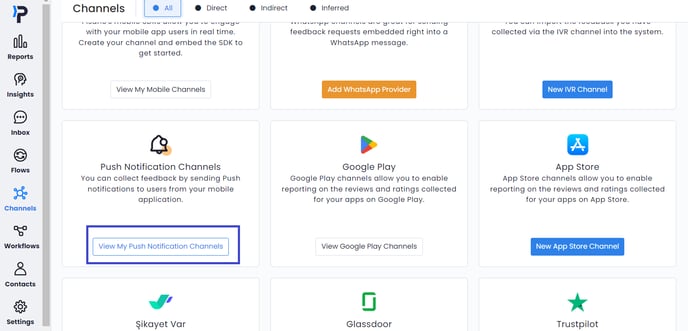
- Go to Channels > Push Notifications> Add to create a new Push notification channel. Click here for more information about Push notification channel creation.
- Click on "Edit Campaign".

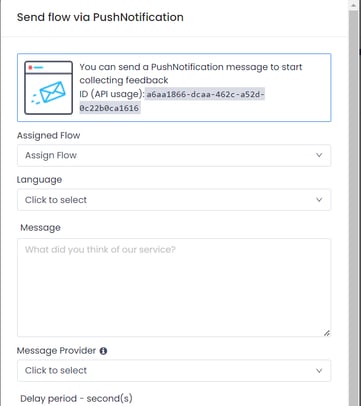
- The API ID that determines which campaign to send is obtained from this screen ( in API usage ). Sample campaign ID:
a6aa1866-dcaa-462c-a52d-0c22b0ca1616 The link generated for the survey is automatically added to the end of the text by the system during the sending process
- Obtaining Token
API Response Codes
Response Status Code
Status
Status Code
Message
200
OK (Successful)
400
bad_request
13000
An error occured
401
unauthorized
13001
Wrong authentication token
404
NOT_FOUND
13002
Requested resource not found!
404
not_found
13003
Reset Token not found
404
not_found
13005
This node, nor any of their parent has any flow
403
forbidden
13007
It's not allowed to update Pisano node
400
bad_request
13008
Record could not be deleted
400
bad_request
13009
Updated question already has responses
404
not_found
13010
User not found
401
unauthorized
13011
User is inactive
409
conflict
13012
Password does not match the old password
403
forbidden
13013
Permission denied
400
bad_request
13014
Wrong activation code
400
bad_request
13015
Required field not present in params!
404
not_found
13016
Token not found
400
bad_request
13017
Duplicate value
404
not_found
13018
Response not found
404
not_found
13019
Activation token not found
400
bad_request
13020
You selected a reserved node type. Please choose another one.
400
bad_request
13024
Multiple responses given for a non-multiple choice question
400
bad_request
13026
Captcha is invalid
400
bad_request
13028
Invalid parameters
400
bad_request
13029
Invalid security hash
400
bad_request
13030
Invalid authentication token
400
bad_request
13031
Invalid proxy server parameters
409
conflict
13032
Wrong credentials
400
bad_request
13033
Invalid SDK credentials
400
bad_request
13034
Invalid Flow
404
not_found
13035
Node not found
403
forbidden
13036
Account locked
400
bad_request
13037
Malformatted CSV
400
bad_request
13038
Required customer identitiy keys not present in params!