
This function is only available for answers to the NPS question.
What You Will Find Here
Creating and setting up the Push Report Metric task
Who Can Access?
This feature is available only for NPS question types.
You must have valid API authentication credentials. This includes a Subscription Key and Basic Auth Credentials. Define these securely before you begin the setup.
How to Access
To reach the task customization window, follow these steps:
-
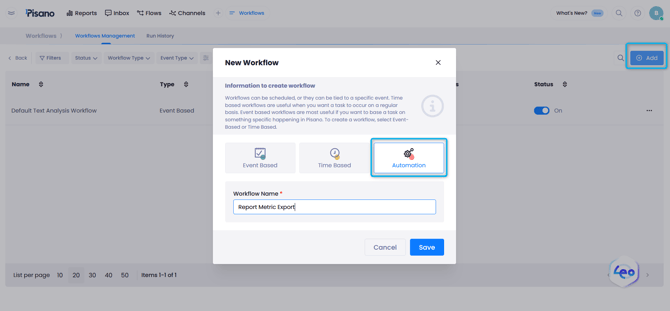
Click Workflows in the main menu.
-
Click the Add button.
-
Select the Automation type.
-
Enter a name for your workflow.
-
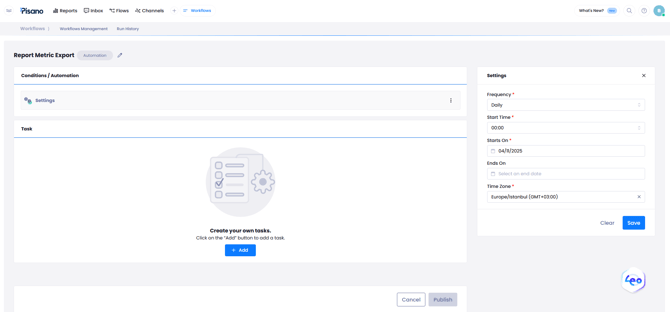
Choose the time cycle for the workflow execution.
-
Select Push Report Metric from the task type list.
-
The task customization window will open.
What You Can Do Here
Creating and setting up the Push Report Metric task
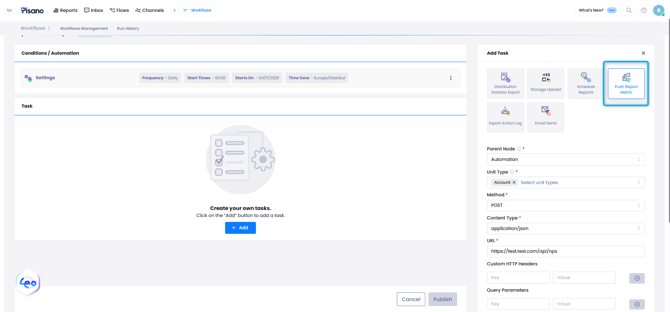
You can configure the workflow to send specific NPS metrics to your external API. You can define which units to report and how the data is structured.
-
Select the unit type for the report. An example is a store.
-
Enter your API information.
-
Provide your authentication credentials.
-
Create the Request Template using JSON format.
-
Use dynamic codes to customize the data structure for specific store IDs.
The system sends daily NPS data to your integrated API in JSON format. This allows you to track store ratings in your external systems.
Notes / Tips / Warnings
The system sends data from the day before the workflow execution date. Review the technical documentation before you create the Request Template.
Limits / Notes
Sample Request Structure
The following JSON shows how the data is organized. The workflow inserts values into the curly brackets automatically.
{
"data": [
]
}
Dynamic Data Fields
Use these fields to populate your JSON template.
| Field | Description |
|---|---|
| Store Code | The external unit ID for items in the Units section. |
| Date | The date in YYYY-MM-DD format or the survey sent date. |
| Total Score | The NPS result for the specific question. |
| Total Score Rounded | The NPS result rounded to the next higher digit. |
| Total Score Count | The total number of responses across all categories. |
| Promoters | The number of responses with a score of 9 or 10. |
| Passives | The number of responses with a score of 7 or 8. |
| Detractors | The number of responses with a score of 6 or lower. |
| Survey Sent Count | The total number of surveys sent for that store on that date. |
Output Example
The system generates data in this format:
{
"data": [
{
"storeCode": "1234",
"date": "2025-07-09",
"totalScore": 12.5,
"totalScoreRounded": 13,
"totalScoreCount": 8,
"promoters": 4,
"passives": 1,
"detractors": 3,
"surveySentCount": 0
}
]
}
FAQs
Can I use this for non-NPS questions?
No. This function is only available for the NPS question type.
What time period does the daily data cover?
The system sends data from the day immediately before the run date.
Is the data format fixed for all external systems?
No. You can customize the data format. You can integrate it with different APIs to match your specific requirements.