
Pisano expects customer or transaction data added as parameters in the URL to be base64 encrypted so that the customer won’t be able to manipulate them by changing the URL. You can learn how to encrypt these values by following the steps below.
Before sending custom values with URL parameters, you need to define custom fields and set their keys in the flow assigned to your channel. These keys determine which custom values will correspond in response to which question in the flow.
- Adding Question Keys to Custom Values in the Flow
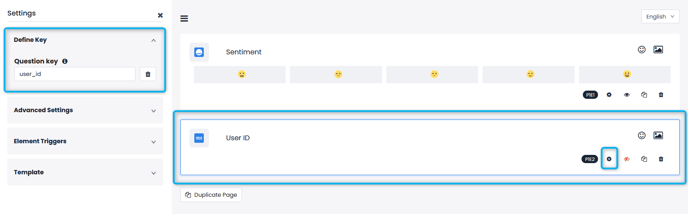
Question keys must not include any spaces. Custome Parameters you add to your flows must be Short Text questions. Hiding these questions will provide a cleaner look to the end-user.
- Creating Personalized Links with URL Parameters
Once the question keys, described in the first step have been determined, you can start sending the custom values corresponding to these questions. The URL parameter is an array of objects in JSON format converted to a string and encoded with base64.
Each object in the array has the following format.

For each custom value you want to send, you must add these custom value objects to an array. After adding all the objects, you can get the responses URL parameter by converting the array to a string and encoding the string with base64. Then you can add this parameter to the end of the feedback link.
Below, you can find a direct example written in JavaScript.

When you follow the steps above, the hash you will get will be like this:
W3sicXVlc3Rpb24iOiJrdWxsYW5pY2lfaWQiLCJhbnN3ZXIiOiJJbnRlZ3JhdGlvbjAxIn1d
https://demo-web.pisano.co/web_feedback?node_id=d330b0c2-e0aa–44e3-a5f7– 8256fbc218ae&responses=W3sicXVlc3Rpb24iOiJrdWxsYW5pY2lfaWQiLCJhbnN3ZXIiOiJJbnRlZ3JhdGlvbjAxIn1d
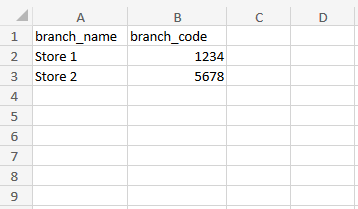
- To create the customized links, simply create an Excel file containing your custom paramaters as column titles and fill out the information you need. An example can be seen below:
- Head to link channels, click "Generate" on the related channel and upload your Excel file. You may choose any relevant information here, if you wish to collect feedback anonymously but with the information you have entered, simply select "I want to continue without selecting a identifier field."
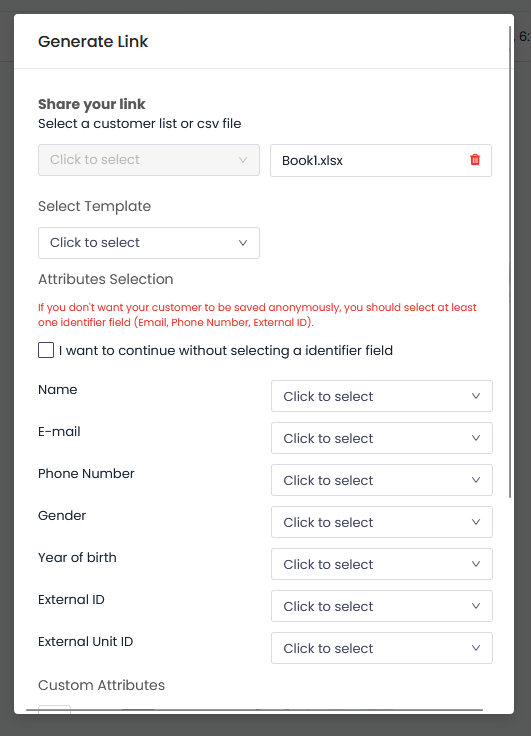
- After you click "Download Generated Links," a mail will be sent to your email and the links will be ready to use.